
Free Invoice Template
Invoices are documents that businesses and self-employed people send to clients to request payment. They usually list the goods or services you provided to clients, and their total cost including taxes. They’re useful for tracking payments and staying organized.

What is the purpose of your Invoice?
Fill forms in a few steps
Save, print & download
Done in 5 minutes
What Is an Invoice?
An Invoice is a form used by a self-employed individual or company when collecting payment from a customer for a product or service.
They’re used for many kinds of transactions, such as:
- Selling goods
- Billing for services
- Charging rent
- Requesting payment for freelance work
This legal document usually includes key information, such as:
- The names and addresses of the company/service provider and client
- A description of the goods or services
- The amount due
- The date the service or goods were delivered
- The date the Invoice was sent
When running your own business, Invoices are an essential document to help you receive payments efficiently and keep track of sales.
If you’re new to creating Invoices, our blank Invoice template can act as a reliable foundation to help you make the process much faster and easier.
Invoice Example
With our Invoice example below, review what information you need to include, as well as how to outline it.
Use this to create an Invoice to charge clients for your products or services.
Invoice from: Invoice to:
[Name] [Name]
[Address] [Address]
[Contact information] [Contact information]
Invoice number #:
Invoice date:
Invoice due date:
Product or Service Description Quantity Unit price $__ Amount $__
Subtotal:
Tax rate:
Tax:
Shipping:
Total:
Terms & Conditions (e.g. Payment methods)
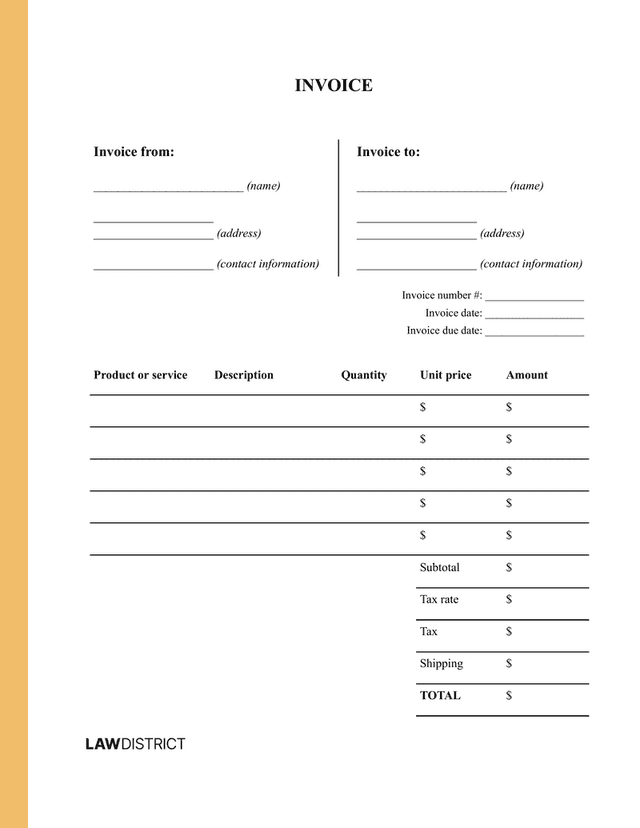
Invoice Sample
If you’re new to collecting payments, it can help to see a real example of an Invoice before creating your own. View our sample Invoice below to get a good idea of what your document should look like when completed.
Legal Requirements of an Invoice
There are no federal laws that set the same Invoice rules across every state. However, there are some U.S. laws that do affect how you can use this document in certain circumstances.
| U.S. law or rule | What it means for Invoices |
|---|---|
| Prompt Payment Act and 5 CFR Part 1315 | Federal agencies must pay proper Invoices on time. Late payments may require interest. |
| 19 U.S.C. § 1481 | Commercial Invoices are often required when goods are imported into the United States. |
| 19 CFR § 141.86 | Import Invoices must include clear details about the goods, value, and parties involved. |
| 39 U.S.C. § 3009 | A business cannot send unordered goods and then demand payment with an Invoice. |
You should check your state’s laws regarding invoice to find out what the rules are in your locality.
Key Elements To Include in an Invoice
There are several elements that you should include in your Invoices, such as:
- The names of both parties
- Their addresses
- Their contact details
- Unique identifier of your or your company
- Description of the product or service
- The amount due
- How payment should be made
- Date the goods or service were delivered
- Date of writing the Invoice
- VAT if applicable
- The total amount to be paid
If you're running an LLC, you need to include your company’s full name as stated by your articles of incorporation.
If you’re a sole trader, you should include your name and the name of your business. Also add the address where your clients can send you any documentation.
How To Create an Invoice Template
To create a professional Invoice, you need more than just the standard elements. You also need to make sure that the structure and tone are correct.
Follow the steps below to create an Invoice correctly:
| Step | Explanation |
|---|---|
| Use a professional template | Choose a clean layout with easy-to-read fonts and clear styling. |
| Add “Invoice” as the header | Make it clear right away that the document is an Invoice. |
| Include all key details | Add names, addresses, dates, payment terms, and item information. |
| Check the totals and taxes | Review all amounts carefully and add tax if needed. |
| List items clearly | Use a line-by-line format to show each product or service, quantity, price, and amount. |
If you need a professional template, you can use our customizable one. Simply enter your details and you’ll receive the finished Invoice instantly, ready to be sent to your clients.
Frequently Asked Questions (FAQs) About Invoices
You can find the answers to some of the most frequently asked questions regarding Invoices below.
An Invoice template allows you to be confident that you’re using a tried-and-tested document that works.
You know that your Invoice contains all the necessary information that you need to get paid on time, without confusing the clients.
Once you've created your Invoice, it’s recommended to have it reviewed by a legal professional.
The best time to send an Invoice is right after you have provided the goods or services to your client. This can help you decrease the billing cycle, and can help you increase your chances of getting paid promptly.
Lawdistrict provides printable free Invoice templates as a smart legal solution that can be edited for whichever industry or field you work in.
These can be filled in through our step-by-step process and with specialized advice.
Keep in mind, you should have it reviewed by a lawyer once it has been completed to help guarantee that all the necessary details have been added.
Try Lawdistrict Now
Instant and complete access to our entire library of legal forms
Edit, download and print in PDF from any device
Save time and money on legal document creation