
Free IRS W-9 Form
An IRS W-9 form is used to give a business, bank, client, or other payer your correct taxpayer identification details. The requester uses this information to prepare tax forms, such as Form 1099, when payments must be reported to the IRS.

Fill forms in a few steps
Save, print & download
Done in 5 minutes
What Is a W-9 Tax Form Used For?
Form W-9, officially called Request for Taxpayer Identification Number and Certification, is used to collect your:
- Name
- Address
- Federal tax classification
- Taxpayer identification number
This information allows payers to identify U.S. persons (citizens and resident aliens) correctly for tax reporting purposes.
It also helps them issue the right tax form later, such as Form 1099-NEC or Form 1099-MISC.
The completed legal document is not sent to the IRS. It's given to the person or business that requested it.
Who Needs to Fill Out a W-9 Form?
A W-9 is usually completed by a person or business that receives reportable payments. This can include:
- Independent contractors and freelancers
- Sole proprietors and self-employed workers
- Vendors and service providers
- Landlords receiving rent
- Attorneys receiving reportable payments
- U.S. corporations, partnerships, trusts, and estates
- Account holders receiving reportable income, such as interest or dividends
The form may also be requested by banks, brokers, payment processors, or companies setting up a vendor record.
When Is a W-9 Not Required?
A W-9 is generally not used for employees. Employees usually complete Form W-4 instead.
Non-U.S. persons and entities also should not usually complete Form W-9. They may need a Form W-8 instead.
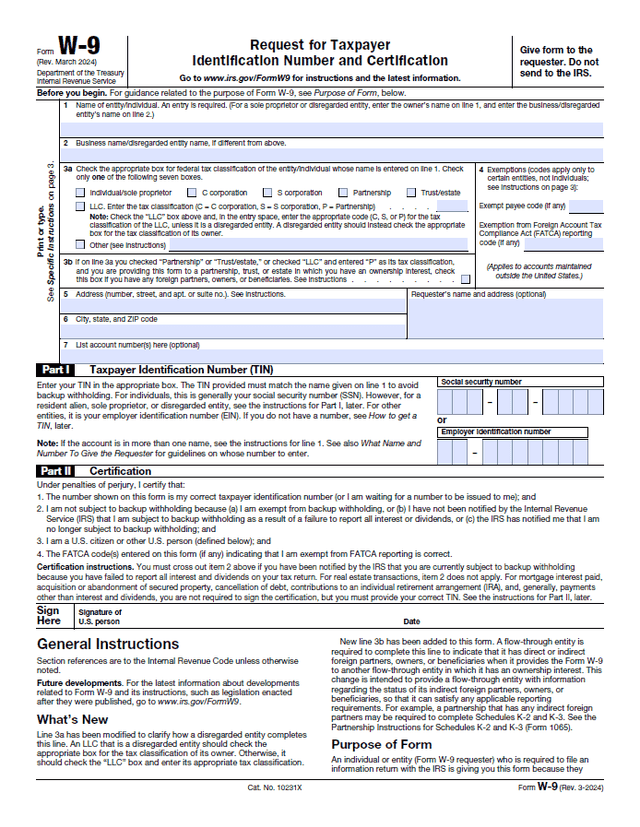
IRS Form W-9 Sample
Before completing a W-9, it can help to review a sample or fillable W-9 template. Take a look at the example below. You can use it as a guide when drafting your own form.
Key Changes for the 2026 Tax Season
The 2026 tax season includes important reporting changes. These changes mainly affect businesses that issue Forms 1099 and apply backup withholding rules.
| Change | Explanation |
|---|---|
| New $2,000 reporting threshold | For tax years beginning after 2025, the minimum threshold for certain information returns and backup withholding increases from $600 to $2,000. The amount will be adjusted for inflation starting in 2027. |
| Form 1099-K threshold | Third-party settlement organizations must report payments only when total payments are over $20,000 and there are more than 200 transactions in the year. |
| E-filing threshold | Businesses with 10 or more information returns generally must file them electronically. |
| Line 3a and Line 3b updates | The current W-9 clarifies how disregarded LLCs should complete Line 3a, It also adds Line 3b for certain entities with foreign partners, owners, or beneficiaries. |
How To Fill Out the W-9 Form
A fillable W-9 form can be completed online, printed, or sent through a secure document system. Follow the steps below to complete the form.
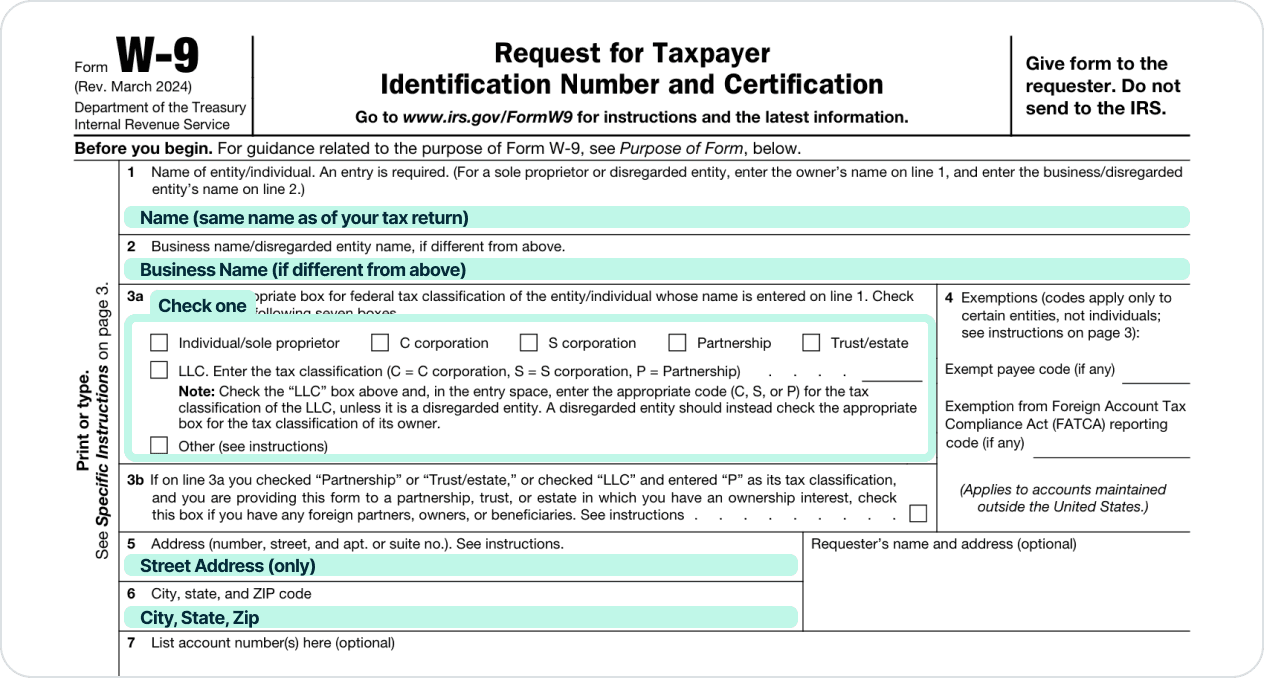
Step 1: Enter Your Legal Name
Write the name shown on your federal tax return. If you are an individual, this is usually your full legal name.
For a disregarded LLC, the owner's name should generally appear on Line 1.
Step 2: Add Your Business Name
Use Line 2 for your:
- Business name
- Trade name
- DBA
- Disregarded entity name
Leave this line blank if you do not use a separate business name.
Step 3: Select Your Tax Classification
Choose the correct federal tax classification. Options include:
- Individual
- C corporation
- S corporation
- Partnership
- Trust
- Estate
- LLC
- Other
LLCs should follow IRS instructions carefully because their tax classification can vary.
Step 4: Complete Exemption Fields if Needed
Most individuals leave the exemption code boxes blank.
Certain corporations, government entities, tax-exempt organizations, or other exempt payees may need to enter a code.
Step 5: Enter Your Address
Next, add your current mailing address. This is the address the requester may use for tax statements or records.
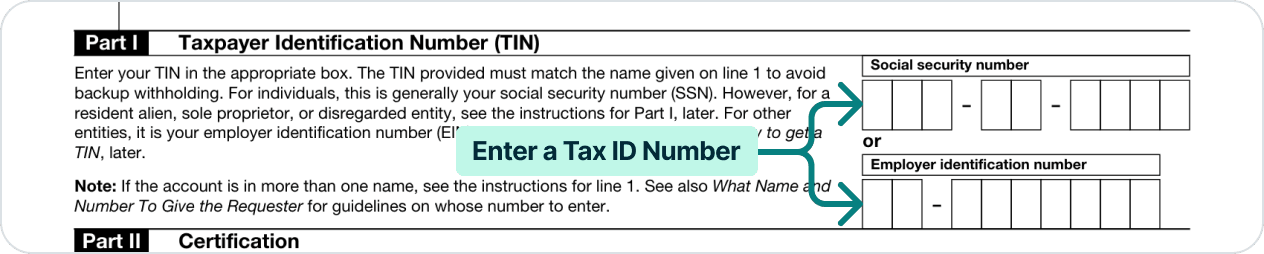
Step 6: Provide Your TIN
Next, provide your taxpayer identification number. This may be a:
- Social Security number
- Employer identification number
- Individual taxpayer identification number
The TIN should match the name on Line 1 to help avoid backup withholding.
Step 7: Sign and Date the Form
By signing, you're certifying that:
- The TIN is correct
- You're a U.S. person
- You're not subject to backup withholding unless stated otherwise
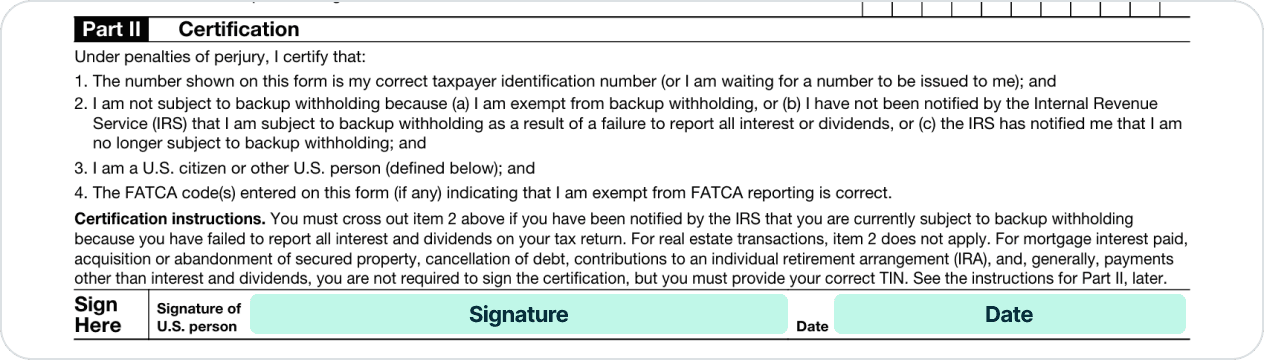
You should then return the completed form to the requester, not the IRS.
If you need to quickly create this document, you can use our fillable W-9 template. Simply enter the relevant details, and you'll instantly receive the completed form.
Penalties and Backup Withholding Rules
W-9 errors can lead to backup withholding, IRS notices, or information return penalties. These rules usually affect both the payer and the payee.
| Rule or Penalty | Explanation |
|---|---|
| Backup withholding | Backup withholding can apply at a flat rate of 24% if a payee does not provide a correct TIN or fails to certify required information. It can apply to many 1099 payments. |
| How to stop backup withholding | The payee usually must correct the issue, such as giving the payer the correct TIN, resolving underreported income, or filing missing returns. |
| 2026 late filing penalties | For information returns due in 2026, IRS penalties are $60, $130, or $340 per return depending on how late the correction is made. Intentional disregard is $680 per return. |
| Separate penalties | The IRS may charge separate penalties for failing to file correct information returns and for failing to provide correct payee statements. |
IRS Form W-9 FAQ
Here are simple answers to common questions about completing and using Form W-9.
Yes. A W-9 can be signed electronically if the requester uses a valid electronic system.
An electronic W-9 should also include the same required information as the official paper form.
No. A new W-9 is not required every year if the information is still correct.
However, a requester should ask for a new form if there's a change in any of the payee's details, such as:
- Name
- Address
- Tax classification
- Taxpayer identification
It's also wise to update your old vendor records.
You should send your completed W-9 to the person or business that requested it. Do not send it to the IRS.
The requester keeps the form and uses the information to prepare tax documents when reporting is required, such as Forms 1099.
Requesters should keep completed W-9 forms for at least 4 years after the date of the transaction or the last tax return filed using that information. This is consistent with IRS record retention guidelines.
It's also good practice to securely store the form, as it contains sensitive taxpayer information such as Social Security Numbers or EINs.
The business may need to apply 24% backup withholding on all payments, or delay payment until correct tax information is provided.
Backup withholding can apply when a payee fails to provide a correct taxpayer identification number. A business should keep records of its request.
Yes, in many cases the payer should request updated tax information from the estate or legal representative.
This may be needed if payments continue after the contractor's death or if tax reporting must be completed under the estate's or beneficiary's information.
Try Lawdistrict Now
Instant and complete access to our entire library of legal forms
Edit, download and print in PDF from any device
Save time and money on legal document creation