
Free Texas Quitclaim Deed Form
A Texas quitclaim deed transfers property from a grantor to a grantee. Unlike a warranty deed, it offers less protection and provides no warranties of clear title, which makes it commonly used between family members and trusted parties.

Are you the Buyer or the Seller?
Fill forms in a few steps
Save, print & download
Done in 5 minutes
What Is a Texas Quitclaim Deed?
A Texas Quitclaim Deed is a legal form used by property owners to transfer the title of an item of real estate without providing guarantees that the owner has full rights to the title.
This allows you (the grantor) to quickly release your interest in the property to a person or business (the grantee). This can be helpful for the purposes of setting up a trust for your assets as part of your estate planning or to avoid probate proceedings in some states.
The document must be signed in front of a notary in order to be considered valid. It must then be registered with a county recording clerk to process the change of title.
Texas Quitclaim Deed Sample
Review the following Quitclaim Deed example to understand what you need to include and how it should be structured.
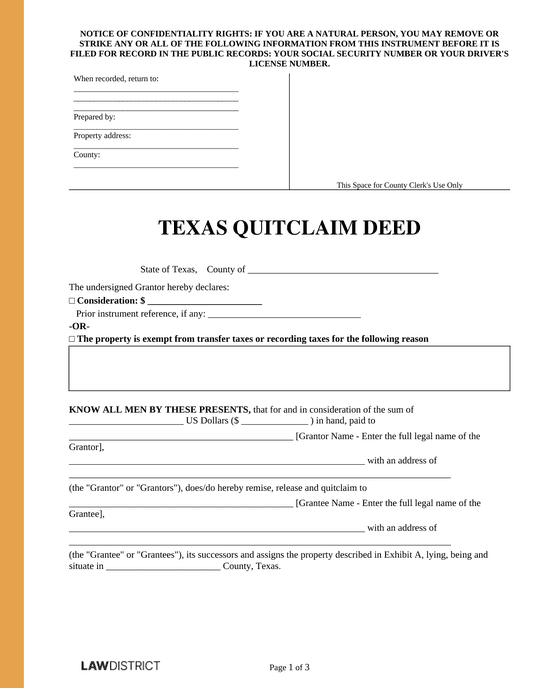
Texas Quitclaim Deed Laws & Requierements
In Texas, quitclaim deeds are governed by specific legal requirements outlined in the Texas Property Code, particularly Chapters 5, 11, 12, and 13.
The following requirements must be met:
- Must include a clear legal description of the property. (Chapter 5)
- Requires the grantor's signature in the presence of 2 witnesses or a notary public. (Chapter 12, Sec. 12.001)
- Language must be in English; if acknowledged outside the U.S., a certified English translation is needed. (Chapter 11, Sec. 11.002)
- Must be filed with the county clerk's office in the county where the property is located. (Chapter 11, Sec. 11.001; Chapter 13, Sec. 13.001)
How To File a Quitclaim Deed in Texas
You need to take several steps to properly file your Quitclaim Deed in Texas with the local county clerk.
Follow the steps below to make sure your Quitclaim Deed is filed correctly.
- Sign and notarize: Sign the document before a notary or two witnesses.
- Include the grantee's address: List the address that is required on the deed or an attached document. Otherwise, penalty fees will apply.
- File with the county clerk: Submit the document to the county clerk's office where the property is located.
- Bring photo ID if filing in person: Texas now requires valid photo ID for in-person filing; however, mail-in options may be available in your county.
- Pay the fee: Pay the filing fee, which is typically $25 for the first page and $4 for each additional page.
Texas Quitclaim Deed FAQs
Find out more about how Texas Quitclaim Deeds work in our FAQs below.
Yes, you must sign any Texas deed before a notary public for it to be fully valid. This is to prevent fraud and to ensure that all parties involved in the transaction are fully conscious of the decision to transfer ownership.
Before creating a Quitclaim Deed it is critical to know that you will still be responsible for paying any outstanding principal and interest on a mortgage in your name. This is because it transfers only title ownership, not debts.
Usually, transactions using Quitclaim Deeds only take place when the person transferring the title has no outstanding mortgages or major liens on the property. This avoids the person paying for a property they no longer have the right to own.
Use Lawdistrict's Texas Quitclaim Deed template to create a document by simply filling in the important details such as the names of each party, the grantee's mailing address, the legal property description, and the consideration amount. Once it's ready, you can sign it before a notary or two witnesses.
Try Lawdistrict Now
Instant and complete access to our entire library of legal forms
Edit, download and print in PDF from any device
Save time and money on legal document creation